
What you will need for the Update:
– Horizon headlight removed from the EUC
– USB-C cable for data transfer (not for charging only)
– flat scredriver or any other flat tool to remove the protective cap
– Windows PC
Step 1 – gently remove the protective cap from USB-C port
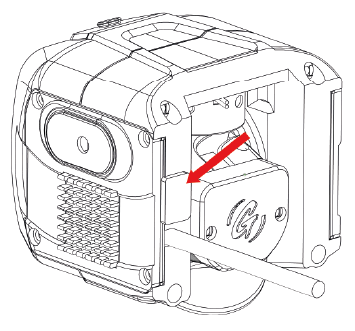
Step 2 – Plug your light to the PC using USB-C cable
Step 3 – download latest Firmware from the bottom of this page. Unzip the package and run the .exe installer. Follow the instructions displayed
Step 4 – plug the protective cap back in. The process is finished and you can mount the light back on your EUC.
Firmware releases:
v1.19.6 , Release date: 21-09-2026
grizzlights_horizon_firmware_1_19_6Changes since previous release:
- Added 3 consecutive flashes instead of 1 for extra visibility when using horn (middle button) or LED flash function (double click right button)
- Added “LED OFF” mode with main LED and DRL disabled and motor noise reduced to minimum. Enter this mode either with button on the lamp (available as a last one, after STROBE mode) or with double click remote left button (cycle between DRL, STROBE and LED OFF).
- Further adjustments in “motor blocked” detection logic to address false 4 beeps error when riding
- Remote control connectivity fixes (connection parameters and scan restart logic)
v1.17.2 , Release date: 10-08-2026
grizzlights_horizon_firmware_1_17_2
Changes since previous release:
- Auto-calibration routine added. Whenever motor homing sequence (initial up and down movement) fails, an auto-calibration attempt is triggered. If that succeeds, new offsets are saved.
- Double click left remote control button to exit LED blink mode.
- Factory calibration steps 2 and 3 swapped: now it’s: 1. gyro calibration, 2. angles calibration, 3. power calibration
v1.16.10 , Release date: 07-07-2026
grizzlights_horizon_firmware_1_16_10
Changes since previous release:
- Motor initial sequence modified to prevent from incorrectly detecting motor collision on startup.
- Bluetooth connectivity improved: fixing initial connection issue for some units/remote controls
- Remote control connect/reconnect issue fixed (some units were unableto reconnect to bluetooth remote control once conection was lost)
- Lidar initialisation fixed when pointing at the sky (in some cases, the initialisation failed with 3 beeps when pointing up at the sky)
v1.16.7 , Release date: 15-06-2026
grizzlights_horizon_firmware_1_16_7
Changes since previous release:
- Detect and enter parking mode when wheel is on kickstand or laying on side. Indicated by 2 “ticks” and pulsing halo. In parking mode all buttons are disabled. Switch back to DRL mode when the wheel is lifted up to normal position
- Added protection against saving calibration/data when the EUC is tilted or resting on the kickstand. Data is now saved only when the wheel is stationary and upright.
- Added a 1.5m distance safeguard in LiDAR+Gyro mode to prevent setting the distance based on nearby obstacles.
- Bluetooth connection parameters updated for better stability
v1.15.4 , Release date: 07-05-2026
Changes since previous release:
- Motor silent mode enabled when not in motion or in daytime modes
- Bluetooth connection parameters modified for better stability and faster initial connection
- Motor homing angle margins increased